Da Fit smart watch won’t charge: clean the contacts!

Published by

on

My partner’s dad came over with his smart watch and the screen wouldn’t turn on and attaching it to the charger wouldn’t do anything. Just a black screen. The magnetic charger didn’t seem to securely attach, but it was attaching to the back of the watch in an awkward way, but the screen stayed black and didn’t show the image of the ‘filling battery’ that it should.

In the end, what worked was cleaning the contacts. On the back of the watch were two small contact points that the charger is supposed to be able to connect with. Somehow these had become covered in gunk, enough to cause the charger to be unable to transmit a charge. Removing this gunk carefully allowed the charger to connect more securely and immediately begin charging again!
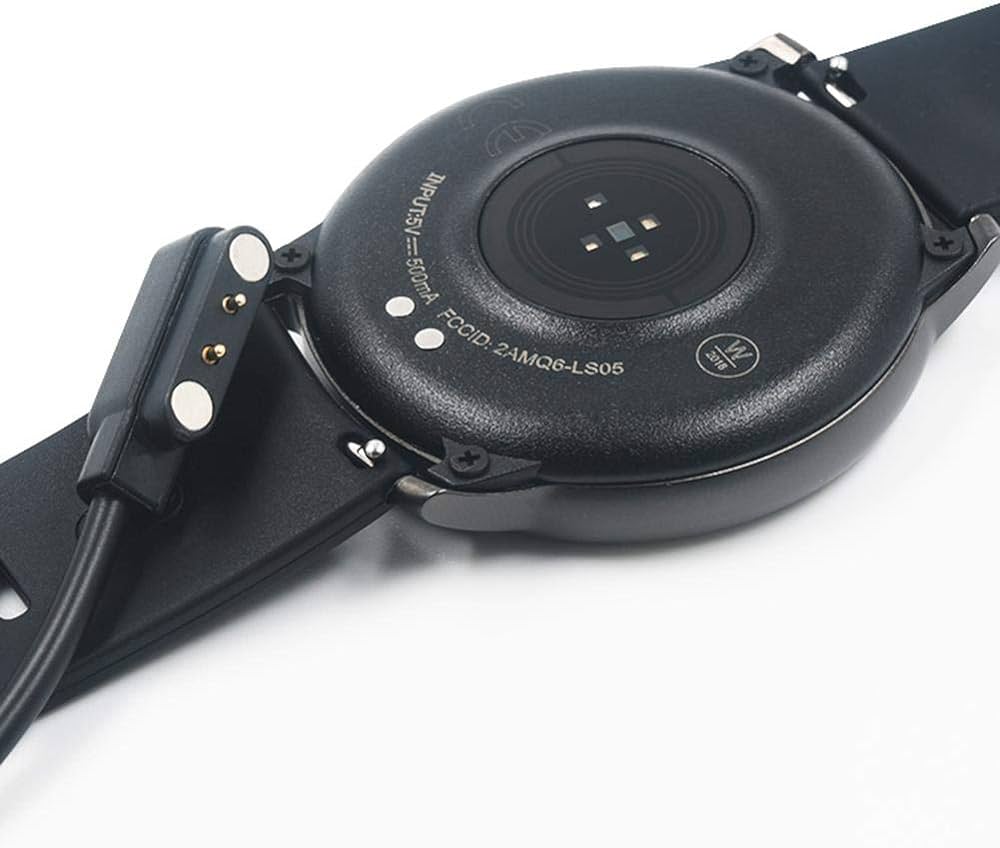
Image of a smart watch showing a magnetic charging cable. Two small dots on the back of the watch match to the two prongs on the charging cable. These are the dots that need to be cleaned.

Note the two small circles on the back.
These contact points must be cleaned!

The other possible solutions I found suggested online (that did not work or were not available to me):

  • Holding down the power button for 60 seconds to perform a hard reset
  • Plugging the charger into different USB ports
  • Trying a different charging cable

NOTE: This post is mostly for me so that the next time I get this issue I can find it again!

8 responses to “Da Fit smart watch won’t charge: clean the contacts!”

  1. Charles Mirabella Avatar
    Charles Mirabella

    my step counter is not working now on my da fit watch. I stored it for about a month, then charged it to 100%. I walked the neighborhood this morning and it still shows 0 steps. I did a hard reset and it still doesn’t work. What can I do to get it to work again?

    1. Jason St-Cyr Avatar

      Hi Charles, I’m sorry your watch isn’t counting steps. Unfortunately, I’m not really a technician, just somebody using Google to search and find solutions when the watch doesn’t work. I might suggest you hit up your favourite search engine and try out some of the options there? I saw several results in my quick search that try to help with troubleshooting it. Maybe the app isn’t linked to the watch anymore? Maybe the reset turned off those tracking options?

      Just be careful of the high-ranking results that show TikTok videos, they don’t seem to actually have helpful videos, just a lot of ads for fitness watches.

  2. Valentin Avatar
    Valentin

    Hello,

    I lost my charging cable for a Da Fit Smart Watch (Military Smart Watch, 1.45 inch AMOLED), could you recommend a compatible model? Thank you!

    1. Jason St-Cyr Avatar

      I’m sorry, Valentin, I’m not really sure what would be compatible. The charging cable does seem pretty standard, you might be able to pick one up on Amazon or find somebody dumping their old watch and you can just get it for the cable?

  3. Jane E Dinsmore Avatar
    Jane E Dinsmore

    I have cleaned the contacts, changed the charging cable, changed the charging outlet base, and my Yihou Smart Watch Fitness Tracker STILL will not charge. The first time two times I charged it, it was finicky but now will not charge at all. And it is only 30 days old. What else can I do?

    1. Jason St-Cyr Avatar

      It seems you’ve tried a lot of the common options. The only one you didn’t list that I’ve seen online was the hard reset of the watch. However, I hesitate to think that might actually fix your situation. You might want to get it checked out? If you have another smart watch, you could test the charging of that watch with your charging gear to eliminate the gear as the problem (though it seems you’ve already tried new pieces there).

  4. Wess Avatar
    Wess

    how to do a hard reset on my smart watch?

    1. Jason St-Cyr Avatar

      Hey Wess, it will depend on the watch that you have. I’m not an expert, so I tried to find some information for you on this using ChatGPT. You’ll need to try it out to see what works for you. You might want to look up the instructions from the manufacturer in the instructions, not only to validate it, but also because you might erase a whole bunch of data that you don’t want to.

      🤖ChatGPT guidance🤖

      1. Apple Watch

      • From the Watch:
        1. Open the Settings app.
        2. Navigate to General > Reset.
        3. Select Erase All Content and Settings.
        4. Enter your passcode to confirm.
      • From the iPhone:
        1. Open the Watch app.
        2. Go to General > Reset.
        3. Tap Erase Apple Watch Content and Settings.
        4. Confirm the action.

      2. Samsung Galaxy Watch

      • From the Watch:
        1. Open Settings.
        2. Navigate to General > Reset.
        3. Tap Reset and confirm.
      • From the Galaxy Wearable App:
        1. Open the app on your connected phone.
        2. Tap Watch settings > General.
        3. Select Reset and confirm.

      For detailed instructions, visit Samsung’s support page: samsung.com

      3. Wear OS Watches (e.g., Fossil, TicWatch)

      • From the Watch:
        1. Swipe down and tap the Settings icon.
        2. Navigate to System.
        3. Scroll to Disconnect & reset or Unpair with phone.
        4. Confirm the reset.

      For more information, refer to Google’s Wear OS support page: support.google.com

      4. Fitbit (Sense and Versa Series)

      • From the Watch:
        1. Open the Settings app.
        2. Navigate to About.
        3. Select Factory Reset.
        4. Confirm the action.

      Detailed steps are available in this guide: theverge.com

      5. Garmin Watches

      • From the Watch:
        1. Press and hold the Light button to access the Controls menu.
        2. Select the Settings gear icon.
        3. Navigate to System > Reset.
        4. Choose Delete Data and Reset Settings.
        5. Confirm by selecting Yes.

      For specific models and troubleshooting, consult Garmin’s support resources.

      Important: A factory reset will erase all data on your smartwatch. Ensure you’ve backed up important information before proceeding. If you encounter issues during the reset process, refer to the manufacturer’s support documentation or contact their customer service for assistance.

Leave a reply to Wess Cancel reply