
 For the last year or so, I’ve been living in a mostly Atlassian world: JIRA OnDemand, BitBucket, SourceTree… likely more before the year is done. Sure, I still use our on-premise TFS 2010 at work along with Visual Studio of various editions, but my ALM world has really been rocked by those gorgeous tools from Atlassian. This past Friday I should have been doing something productive (like writing a blog post) but suddenly I was captivated by the world of Visual Studio Online.
How it starts
Last week my colleague asked what the difference was between Visual Studio 2013 and 2012. I honestly hadn’t looked into it, so didn’t have an answer. Which of course made my obsessive compulsive behaviour kick in. So I google’d (yes, that is a real verb) “Visual Studio 2013” and clicked on the first link I received in the search results. The top banner on the page told me Visual Studio Online was now available to everybody. For free.
Free. I like free.
So I don’t even have a copy of Visual Studio 2013 yet and I’m already clicking into something new. More freebies! That single marketing banner added at least a 500% increase to my toolset beyond what I intended to do Friday evening. In the next few minutes, I’d created my own Visual Studio Online (VSO) portal, complete with a new project, and a Git repository. I can even get another 4 friends in here, without paying a cent for (basic) licensing. So now I could start downloading and installing Visual Studio Express. Again, free. This was probably the longest portion as it took almost 20 minutes to download and install end-to-end. You know what this did? Made me spend more time investigating VSO.
Backlogged
So I have a few minutes to wait on the install, and now I’m back in VSO and clicking around on things. I’d seen this before as Team Foundation Service last year, so for the most part I was familiar with what was here already. During the time it took me to install, I had configured my profile picture, set my sprint capacity and start/end dates, created my initial backlog stories, and started tasking them out on the workboard. Note: One of the default links on the VSO allows you to create Features. Great! Yeah, sort of. The Features section of the backlog requires more than Basic licensing, so be careful before you create a bunch of Features that you won’t be able to manage easily. You can still get to them using queries, but who wants to do that? 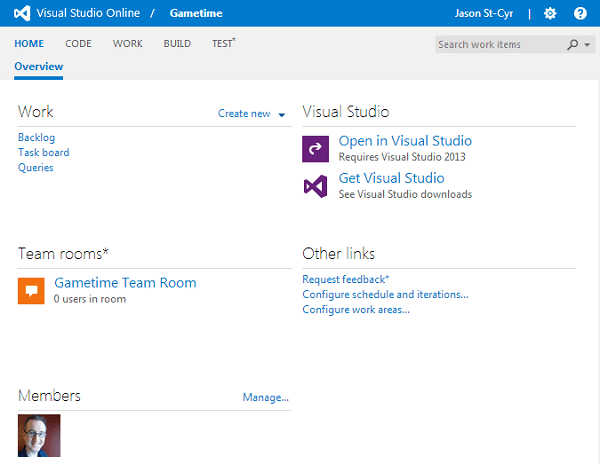
Ready to build
Once Visual Studio was installed, it didn’t take long to create a quick solution with a single project and test the repository check-ins. Without installing any Git plugins or console tools, I could use Visual Studio to directly connect to my VSO project and push to my Git repository. Completely seamless. Not only that, but I’m set to start automated builds in VSO without any additional tools. This is a big bonus, as I hate having to start over setting up a TeamCity server or some other tool. Having the builds right there really gets things started right. At this point, I’ve only spent about 45 minutes, and I’m pretty much ready to go.
Mongolab for the combo take-down
While having my ALM toolset covered was great, I couldn’t actually build something real without a database back-end. That’s where Mongolab came to my rescue. Hosted MongoDb databases, available for free if you just want a single sandbox with less than 500 megs of data storage. For quick development and PoCs, this is perfect. The configuration wizard had me set up with a hosted database in the cloud inside of 5 minutes, and with the MongoDb C# driver installed via a NuGet package I was able to spin up a basic data layer and test it out inside of 20 minutes. That included the research to get the driver and install it. Now, I’m ready to get going with my prototype. I’ve spent zero dollars, just over an hour of time, and feeling groovy!
Getting it out there
The final piece of the puzzle will be virtual hosting. I’m going to need to spend some time on this one, as there are a lot of sketchy or expensive hosting options. I’ll be looking to get something that lets me directly publish from VSO, ideally is a cloud-based Microsoft web server, and most of all is free. Let me know if you’ve seen a good solution for this!
If you’re into ALM, some other stuff:
- 4 ways to change so you can deliver more often
- ALM 101: An introduction to application lifecycle management (slideshare)
- Why does ALM matter for Sitecore implementations?
- 7 tips for automated testing in Sitecore with Selenium
- Making the case for Continuous Deployment
- Continuous Deployment: The Dirty Details


 St-Cyr Thoughts
Leave a reply to Phillip Wolf Cancel reply