
SPECIAL NOTE: This article is a lead up for my November 30th #SCUniversity session on Continuous Integration and Deployment. Register for the webinar now!
When you are setting up your Continuous Integration build definition in Visual Studio Team Services (VSTS, formerly Visual Studio Online) you will get a NuGet Restore step that by default will work with any standard NuGet feeds. However, if you try to build your solution with Sitecore NuGet references it can’t download the packages. Time for your NuGet.config!
Step 1: NuGet.config for your Sitecore project
You need to create a file named ‘nuget.config’ in your solution with the following content. The most important element is adding the Sitecore NuGet feed as a package source:
<?xml version="1.0" encoding="utf-8"?>
<configuration>
	<packageSources>
		<!-- remove any machine-wide sources with <clear/> -->
		<clear />
		<!-- add a Team Services feed -->
		<add key="SitecoreNuGet" value="https://sitecore.myget.org/F/sc-packages/api/v3/index.json" />
		<!-- also get packages from the NuGet Gallery -->
		<add key="nuget.org" value="https://www.nuget.org/api/v2/" />
	</packageSources>
	<activePackageSource>
		<add key="All" value="(Aggregate source)" />
	</activePackageSource>
</configuration>
Step 2: Update location in the NuGet restore step
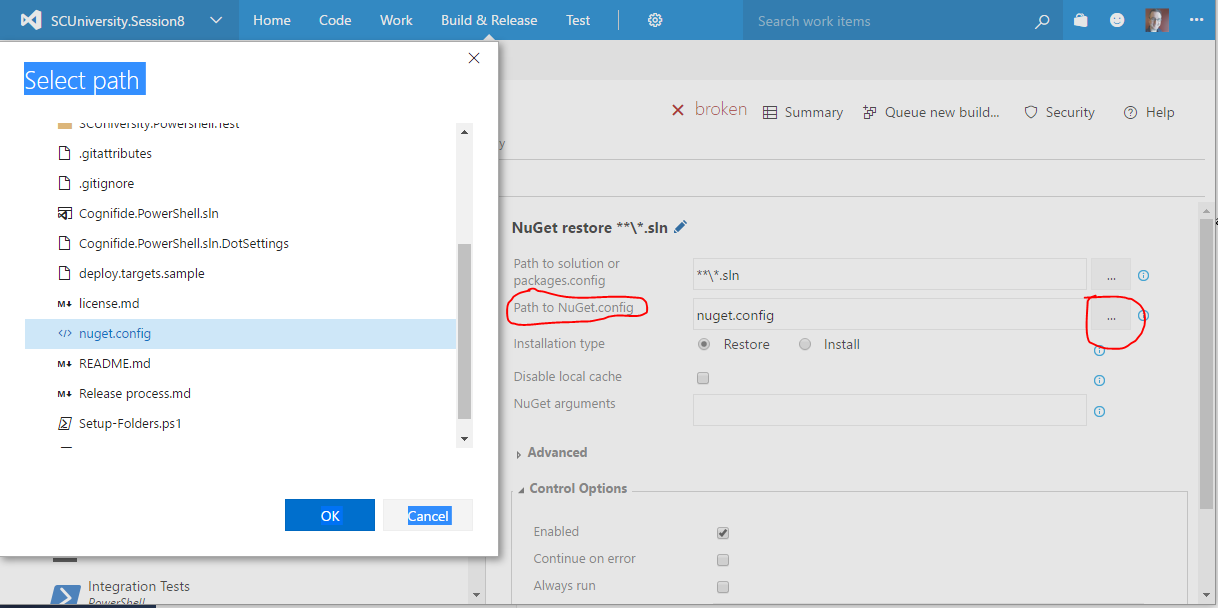
Once the file is in your repository, you can select the NuGet.config file in your NuGet restore step. Simply go to your build definition, select the NuGet restore step, and launch the dialog for the Path to NuGet.config setting.

 St-Cyr Thoughts
Leave a comment